We got the chance to review a protection program for your home computer. It was called Action Alert.

Here is how Brian Lawson, creator of Action Alert describes it:
Action Alert is an easy to use, patent pending, award winning computer safety solution that gives parents everything they need to create a "kid safe" computing environment. Simply installing Action Alert onto the family or kids PC gives parents an easy way to filter and block unwanted content, control when the computer is used and for how long and be informed when dangers or suspicious activity occurs. (like if a child gives out personal information online) Action Alert maximum protection allows parents to review all computer activity as easy as watching a DVR. This unique feature provides an easy way to create the environment that is constantly recommended by experts - an environment where kids know that their parents are not shut out of their “online world”.
I was pretty interested in reviewing something like this, mostly because we have never had (other than standard virus stuff) any kind of protective software before.
We have a desktop computer and an semi old laptop. The desktop is in the middle of our living room.....and it really used most often by all of us. It is faster and easier to use. Our laptop is usually used at the kitchen or dining room tables....all within a few steps of the living room.
But, lately, the bigger kids have been starting to take the laptop downstairs with them to follow sports scores (D-man) or listen to music to choreograph a new dance number (A-girl, L-girl, S-girl and V-girl).
That is the part that occasionally makes me a bit nervous. I don't like to go down to our basement. It makes me sad.
So, having the option to have Action Alert on our laptop was interesting.
Here are the tools that it gives you access to in protecting your computer.
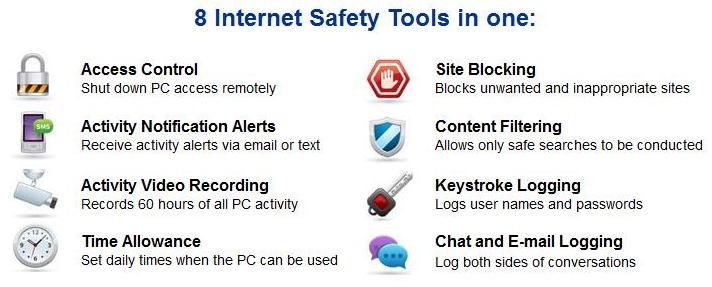
The program will block certain websites/content from coming up and will also send me e-mails stating that certain things had been typed into a search engine and blocked. I could have set it up to limit and set the times of day when the computer could be used. I didn't do that...but I could have.
I have to be honest. The only alerts I received are on the things that
I (in the name of research) personally searched on the laptop.
After I searched those "things", an e-mail came to my e-mail address and said "*******" was typed into a search engine at a specific time and date. I would imagine that the time/date thingie could come in handy if you had numerous possible users to help to narrow down who the culprit was.
I typed in a few "things" that I wouldn't really want my kids to ever search....and certainly not ever find. I got somewhat mixed results. Some things it would bring up like usual in a serach engine, but then when I clicked on them to go to the page....it told me that the website was blocked.
In another case, there were websites that it did allow me to access.....that I honestly wish I didn't even know existed.....but I can't erase the memory.
Now, I could actually block those sites...now that I know they exist....but I know there are many, many more out there that I don't know about.
Overall, I think it is a good program to have on your computer. It does give me more of a sense of peace that I will be notified in at least some cases if the kids are trying to jump around on the internet to inappropriate places.
But, like life, there are no 100% guarantees that you will be protected and blocked from everything yucky.
The program has received awards from Disney and has also received the Safe Family seal of approval.


They were event featured on NBC's Today Show. Probably not impressive, if you prefer Good Morning America or The Early Show though....

Another interesting feature in this program is that you can shut down access on the computer remotely. So, if you are at work and you get a notification that someone was searching "XYZ" on the computer....you could just simply shut down their access right from the office. The power!
I used the Maximum Protection plan offered by Action Alert, which normally costs $29.99 but there is also a
free version too.
When we first got this product to review, Brian Lawson sent an e-mail explaining the product and said this, "
It’s our goal to spread the word about our 100% free version of Action Alert so that families have no reason to put off creating a safer online environment for their kids."
I love that this product isn't just out to make money....but seems to really want to help protect your families.
Have more questions? Go to their Frequently Asked Questions page to see if your question is there.
Questions answered? Good. I don't think you have anything to lose with at least trying the free version, but go and see for yourself.
Take a
look at what other TOS reviewers thought.







 Posts
Posts