If you want to find out what I mean, go read my article at Home and School Mosaics this month!
http://homeschoolmosaics.com/ive-got-nothing/
Recent Posts
Thursday, June 25, 2015


Wednesday, June 17, 2015
CTC Math - Review
Here is one more on-line schooling option for you to consider to help make your lives easier. This one is called CTC Math. We got to use the 12 Month Family Plan designed especially for homeschoolers. This subscription can be used for up to 10 children. Yes, I said 10! I assume they picked this number because the teacher, Pat Murray, actually has 10 children.

CTC Math is just what is says, an on-line math tutor. It is available for pretty much any level of math (Kindergarten through Calculus) and you can use it any hour of the day...or night.
It operates pretty simply once you log on too and each lesson only lasts about 10-15 minutes. Anybody can sit through that much math, right? The creator of this math program decided to keep it that short because he wanted to explain stuff in the simplest, most logical way (something that despite the efforts and reasons behind all the Common Core stuff - they just absolutely do NOT do). They do show different ways to solve a problem, but, they keep it simple.
This program originated in Australia. Which, I will admit, by using it, makes me feel sort of cool and international. I love listening to the kids do their math with the teacher's Australian accent. It is relaxing and sing song-y in all the right ways.
First your student logs in and gets this screen where you pick your area of study....and your grade level/course. In this case, this is S-girl's page and choices.

In this example, I picked 2nd grade, Number Patterns and Algebra, then Whole Numbers:

There is a video (the short one I mentioned above) that explains that days lesson and how to do the math. Then there are the lessons/questions for you to work through.
Your kids have the chance to earn certificates for completing and doing well in the subjects. But, I gotta say that my kids aren't motivated or excited about those kinds of things, so that wasn't a big deal for them
One of the best features that I found (and I like this for MY stuff on the computer too) is the ability to stop and rewind the lessons, so it is okay if you didn't quite get it/hear it, the first time. You just go back and listen/watch again....until you do. Easy peasy.
I also liked that the graphics were helpful without being distracting. No cartoons. No "in your face" colors. Just arrows, highlighting and muted color schemes that are interesting, but easy on the eyes. In some of the lessons, they ask you do do the work the old fashioned (normal) way on pencil and paper. I am a big fan of old fashioned education and that you need to figure out how to work the problems, how to show your work and how to go back and dig through and figure out where you went wrong.
That brings me to what happens when you get stuff wrong. You know exactly what you get wrong and you have the chance to go back and work through it to try again and get it right...and, when you do that, you get credit for it. And, if you absolutely cannot figure out where you went wrong or even where to start on how to get it right, you do have access to the answers so you can see how you should have worked the problem. I also got a weekly downloadable PDF report sent to my e-mail that covered everything that each kid had completed and how they did in each area.
For a math program that my kids are having to do on their summer break, CTC Math is a good one. Poor little dears! I actually think it is ending up being a good thing to keep their math on point and will help come the start of our official home classes again in August. There won't be such a lag those first few weeks of school.
Overall, CTC Math is a really good, solid, quick, simple program for learning math at home. We didn't get a chance to use it in the upper grade levels, but were really pleased with the lower grade levels. When you subscribe to CTC Math, you have access to all grade levels, so your student can work ahead or even jump around to some of their other more difficult areas.
I also got a weekly downloadable PDF report sent to my e-mail that covered everything that each kid had completed and how they did in each area.
You can find more information on subscribing to the 12 month family plan for homeschoolers or the regular CTC Math plan for non-homeschoolers.
Other TOS Reviewers may have tried out different grade levels and parts of the program, so go see what they thought of their experience with CTC Math.

CTC Math is just what is says, an on-line math tutor. It is available for pretty much any level of math (Kindergarten through Calculus) and you can use it any hour of the day...or night.
It operates pretty simply once you log on too and each lesson only lasts about 10-15 minutes. Anybody can sit through that much math, right? The creator of this math program decided to keep it that short because he wanted to explain stuff in the simplest, most logical way (something that despite the efforts and reasons behind all the Common Core stuff - they just absolutely do NOT do). They do show different ways to solve a problem, but, they keep it simple.
This program originated in Australia. Which, I will admit, by using it, makes me feel sort of cool and international. I love listening to the kids do their math with the teacher's Australian accent. It is relaxing and sing song-y in all the right ways.
First your student logs in and gets this screen where you pick your area of study....and your grade level/course. In this case, this is S-girl's page and choices.

In this example, I picked 2nd grade, Number Patterns and Algebra, then Whole Numbers:

There is a video (the short one I mentioned above) that explains that days lesson and how to do the math. Then there are the lessons/questions for you to work through.
Your kids have the chance to earn certificates for completing and doing well in the subjects. But, I gotta say that my kids aren't motivated or excited about those kinds of things, so that wasn't a big deal for them
One of the best features that I found (and I like this for MY stuff on the computer too) is the ability to stop and rewind the lessons, so it is okay if you didn't quite get it/hear it, the first time. You just go back and listen/watch again....until you do. Easy peasy.
I also liked that the graphics were helpful without being distracting. No cartoons. No "in your face" colors. Just arrows, highlighting and muted color schemes that are interesting, but easy on the eyes. In some of the lessons, they ask you do do the work the old fashioned (normal) way on pencil and paper. I am a big fan of old fashioned education and that you need to figure out how to work the problems, how to show your work and how to go back and dig through and figure out where you went wrong.
That brings me to what happens when you get stuff wrong. You know exactly what you get wrong and you have the chance to go back and work through it to try again and get it right...and, when you do that, you get credit for it. And, if you absolutely cannot figure out where you went wrong or even where to start on how to get it right, you do have access to the answers so you can see how you should have worked the problem. I also got a weekly downloadable PDF report sent to my e-mail that covered everything that each kid had completed and how they did in each area.
For a math program that my kids are having to do on their summer break, CTC Math is a good one. Poor little dears!
I actually think it is ending up being a good thing to keep their math on point and will help come the start of our official home classes again in August. There won't be such a lag those first few weeks of school.Overall, CTC Math is a really good, solid, quick, simple program for learning math at home. We didn't get a chance to use it in the upper grade levels, but were really pleased with the lower grade levels. When you subscribe to CTC Math, you have access to all grade levels, so your student can work ahead or even jump around to some of their other more difficult areas.
I also got a weekly downloadable PDF report sent to my e-mail that covered everything that each kid had completed and how they did in each area.
You can find more information on subscribing to the 12 month family plan for homeschoolers or the regular CTC Math plan for non-homeschoolers.
Other TOS Reviewers may have tried out different grade levels and parts of the program, so go see what they thought of their experience with CTC Math.
Tuesday, June 16, 2015
Dynamic Literacy - Review
Here is a fun one we got to try from Dynamic Literacy called WordBuildOnLine.

WordBuildOnLine is a vocabulary program that spends time working on individual parts of the words and what they mean. (Like root words, suffixes and prefixes). The program we used was designed for 2nd through 5th grade, so S-girl and A-man were my lucky students for this one.
WordBuildOnLine has you doing the same group of five activities for each unit. So, each day, you log on and hit the start button.

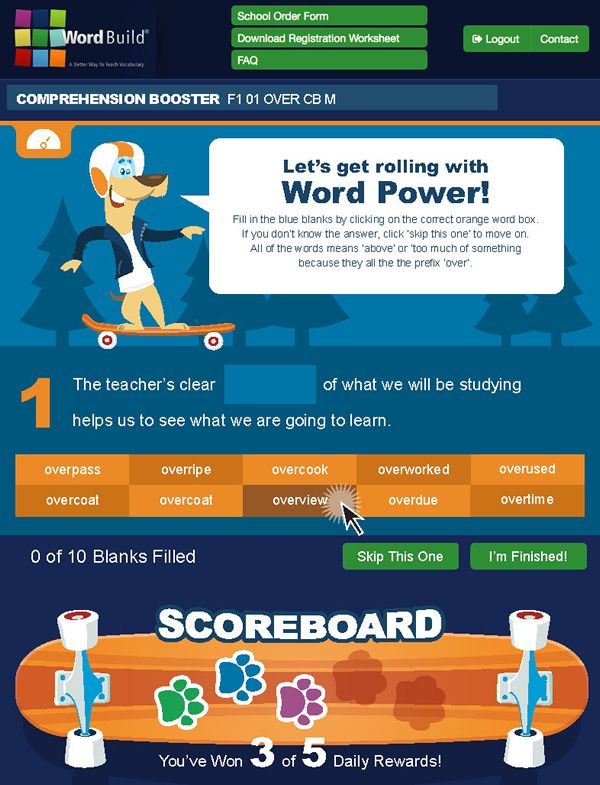
First you will see a short little video After the video, you will do your activities. It is designed to take less than 15 minutes total to finish. There is even a timer in the upper right hand corner of the screen that counts down your time spent. In addition, the activities keep track of how long you are taking to complete them individually too.
Now, they even specifically say in ALL CAPS that the timer isn't supposed to be used as A RACE TO SEE HOW FAST YOU CAN DO THIS. But, they have obviously NOT met me OR my children. It is one of those personal points of pride to try to beat your score and do things just a little bit faster than you did last time.

This program is also designed to just truly work for 15 minutes a day, so you don't spend too much time on them. But, again, the Dynamic Literacy folks haven't met my children. When my kids were having fun....or, yes, beating the clock (even though it was very carefully explained to them that it wasn't a race), they would just keep clicking on Continue and Let's Go....and, just...keep on going until they were bored or sick of it. I honestly think that they did a whole week of lessons in one day once. Because they did it this way, I wasn't a stickler about them spending time EVERY day working on WordBuildOnline. But, that is the intended way for it to be used....a little at a time....a little every day.
My kids are just weird.
I was able to just remind them to get their WordBuild stuff in before they had their regular computer free time. I never got any complaining from them. I took that as a good sign that the program was well done and not something that the kids would dread having to get over with, like a chore....or bath time. Ha!!!
Things were also explained well enough that it was okay if I wasn't around when it was time to do their WordBuild stuff. Plus, the system sent me an e-mail telling me when they finished an activity and told me what they had finished. However, it would be worded like this: "S-girl has finished F1 03 ED MS N". So, yeah, in order for me to really know what they had studied I had to ask them or go dig around my parent page for their lessons.

There was one activity where it seemed like I got a lot more questions about than others. Below is a screenshot of the one that was, for them, a little on the tough side. Words and definitions part of, in this case, the prefix "in". They were totally fine creating the words, but had a little more trouble putting into words definitions for their new word. Definitely good practice, but a little tricky. I got a lot of questions like, "Mom! What is a definition of outfield?" or, "Mom! What do I put for infill?"
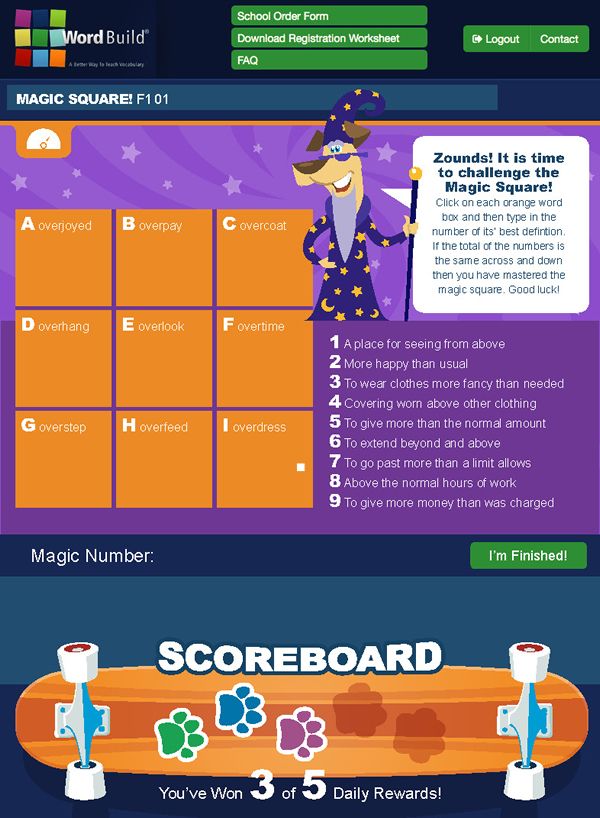
 Overall, we all liked WordBuildOnLine. The kids liked it because it was fun and moved fast. They also liked it because it wasn't too brightly colored or, in their words.... "baby-ish".. This Magic Square game was listed by both A-man and S-girl as one of their favorite "games" in WordBuild.
I liked WordBuild because it was teaching really solid vocabulary and word building principles. It actually reminds me of the approach we take with our older kids with Greek and Latin morphemes. I like that we are starting that approach and way of thinking with the younger kids. I also like some of their encouraging little cheerleading phrases when the kids would get something right.
"Correctamundo!"
"Nurse, bring me an ice pack! This one is on fire!"
The only two bummer kinds of things I can think of is the e-mails that took a special decoder ring to figure out what they had studied that day, and that it took a little bit for them to figure out how to actually click and answer the questions. It isn't a typical double click or even a click and drag thing. You click on the answer and then click in the space for the answer. It was only frustrating to them for the first few lessons, but, then we ALL figured out what needed to happen.
But, that is pretty much the extent of the stuff we didn't like with this program. This was a fun one. A helpful one. A quick one. A really good strong early elementary vocabulary program.
If I have intrigued you to check out Dynamic Literacy and WordBuildOnline for yourself, I have a special reader treat for you! Just enter the coupon Code fridge at checkout and you will get 25% off any of the books at http://www.dynamichomeschool.com/ or 10% off of http://www.wordbuildonline.com/.
Check out what other TOS Reviewers thought about the Dynamic Literacy products they got a chance to try....some where actual physical workbooks (thus the coupon code for a percentage off of books!)
WordBuildOnLine is a vocabulary program that spends time working on individual parts of the words and what they mean. (Like root words, suffixes and prefixes). The program we used was designed for 2nd through 5th grade, so S-girl and A-man were my lucky students for this one.
WordBuildOnLine has you doing the same group of five activities for each unit. So, each day, you log on and hit the start button.

First you will see a short little video After the video, you will do your activities. It is designed to take less than 15 minutes total to finish. There is even a timer in the upper right hand corner of the screen that counts down your time spent. In addition, the activities keep track of how long you are taking to complete them individually too.
Now, they even specifically say in ALL CAPS that the timer isn't supposed to be used as A RACE TO SEE HOW FAST YOU CAN DO THIS. But, they have obviously NOT met me OR my children.
It is one of those personal points of pride to try to beat your score and do things just a little bit faster than you did last time.
This program is also designed to just truly work for 15 minutes a day, so you don't spend too much time on them. But, again, the Dynamic Literacy folks haven't met my children. When my kids were having fun....or, yes, beating the clock (even though it was very carefully explained to them that it wasn't a race), they would just keep clicking on Continue and Let's Go....and, just...keep on going until they were bored or sick of it. I honestly think that they did a whole week of lessons in one day once. Because they did it this way, I wasn't a stickler about them spending time EVERY day working on WordBuildOnline. But, that is the intended way for it to be used....a little at a time....a little every day.
My kids are just weird.
I was able to just remind them to get their WordBuild stuff in before they had their regular computer free time. I never got any complaining from them. I took that as a good sign that the program was well done and not something that the kids would dread having to get over with, like a chore....or bath time. Ha!!!
Things were also explained well enough that it was okay if I wasn't around when it was time to do their WordBuild stuff. Plus, the system sent me an e-mail telling me when they finished an activity and told me what they had finished. However, it would be worded like this: "S-girl has finished F1 03 ED MS N". So, yeah, in order for me to really know what they had studied I had to ask them or go dig around my parent page for their lessons.

There was one activity where it seemed like I got a lot more questions about than others. Below is a screenshot of the one that was, for them, a little on the tough side. Words and definitions part of, in this case, the prefix "in". They were totally fine creating the words, but had a little more trouble putting into words definitions for their new word. Definitely good practice, but a little tricky. I got a lot of questions like, "Mom! What is a definition of outfield?" or, "Mom! What do I put for infill?"

I liked WordBuild because it was teaching really solid vocabulary and word building principles. It actually reminds me of the approach we take with our older kids with Greek and Latin morphemes. I like that we are starting that approach and way of thinking with the younger kids. I also like some of their encouraging little cheerleading phrases when the kids would get something right.
"Correctamundo!"
"Nurse, bring me an ice pack! This one is on fire!"
The only two bummer kinds of things I can think of is the e-mails that took a special decoder ring to figure out what they had studied that day, and that it took a little bit for them to figure out how to actually click and answer the questions. It isn't a typical double click or even a click and drag thing. You click on the answer and then click in the space for the answer. It was only frustrating to them for the first few lessons, but, then we ALL figured out what needed to happen.
But, that is pretty much the extent of the stuff we didn't like with this program. This was a fun one. A helpful one. A quick one. A really good strong early elementary vocabulary program.
If I have intrigued you to check out Dynamic Literacy and WordBuildOnline for yourself, I have a special reader treat for you! Just enter the coupon Code fridge at checkout and you will get 25% off any of the books at http://www.dynamichomeschool.com/ or 10% off of http://www.wordbuildonline.com/.
Check out what other TOS Reviewers thought about the Dynamic Literacy products they got a chance to try....some where actual physical workbooks (thus the coupon code for a percentage off of books!)


 Posts
Posts